AstroGauge Deep Dive
What makes a good night? Ideal conditions in AstroGauge
How I set Ideal and Acceptable conditions for Moon phase, Galactic core visibility, separation and clouds, then read preference scores and overlapping shooting windows.
Explore AstroGauge“Good conditions” sounds wonderfully simple until I try to define it. Do I want the darkest possible sky, or enough Moon to light a ridge? Does the Galactic core need to be high for most of the night, or do I only need a short opportunity after dinner? Those are different photographs, and I want my planning app to understand the difference.
In Settings → Ideal conditions, I can tell AstroGauge what I care about. This is the more detailed companion to my astrophotography planning article: the place where a vague hope for a nice night becomes a set of useful preferences.
I start with a photograph, then a preset
I do not start by turning every condition on. I think about the image first, then choose a starting point. Dark skies considers Moon phase, time with the Moon up and cloud cover. Default brings in core height and the Moon’s distance from the core-side Milky Way. Moonlit scenery starts with a brighter Moon and more time with it above the horizon.
A preset replaces the draft definitions, so I choose it before fine-tuning. When I adjust its conditions, the profile becomes Custom. That is useful: the preset gets me moving, but it does not need to make the creative decisions for me.
Ideal is the wish; Acceptable is the wiggle room
Each included condition has an Ideal definition and an Acceptable one. I use Ideal for the conditions I would be delighted to find. Acceptable describes the compromise I would still consider worth working with. The range controls let me choose At most, At least or Between; the boundary values count as inside the range.
For example, I might prefer a Moon phase of at most 15% but accept up to 40%. The app can build the Acceptable limits automatically from my Ideal choices. If I choose Custom limits instead, I can adjust them myself. Acceptable always includes Ideal, and changing Ideal expands those custom limits when necessary.
There is a second question hiding inside most definitions: for how much of the night? A clear ten minutes and a clear evening are different opportunities. “Time within this range” lets me express that distinction. For the Moon and core visibility conditions, the control is simply the share of the night spent above the horizon.
The conditions I can actually choose
I open a condition and turn on Include in my rating when it matters to this shoot. These are the seven definitions in the current editor. I find it easier to tune them when I am clear about what each one measures.
| Condition | What I am asking for |
|---|---|
| Moon phase | A preferred illuminated fraction while the Moon is up. Moon-down time contributes no Moon interference to this assessment. |
| Moon time above the horizon | How much of the astronomical night I want the Moon above 0°. |
| Core above the horizon | How much of the astronomical night I want the Galactic core above 0°. |
| Core height | The core altitude range I want, and how much of the night it should spend there. |
| Distance from the Moon | Separation from the Moon’s disk to the whole visible modeled Galactic plane. |
| Moon distance from core-side Milky Way | Separation from the visible half of the band centred on the Galactic core. |
| Total cloud cover | The forecast fraction of sky covered by cloud, and how much of the night should meet my limit. |
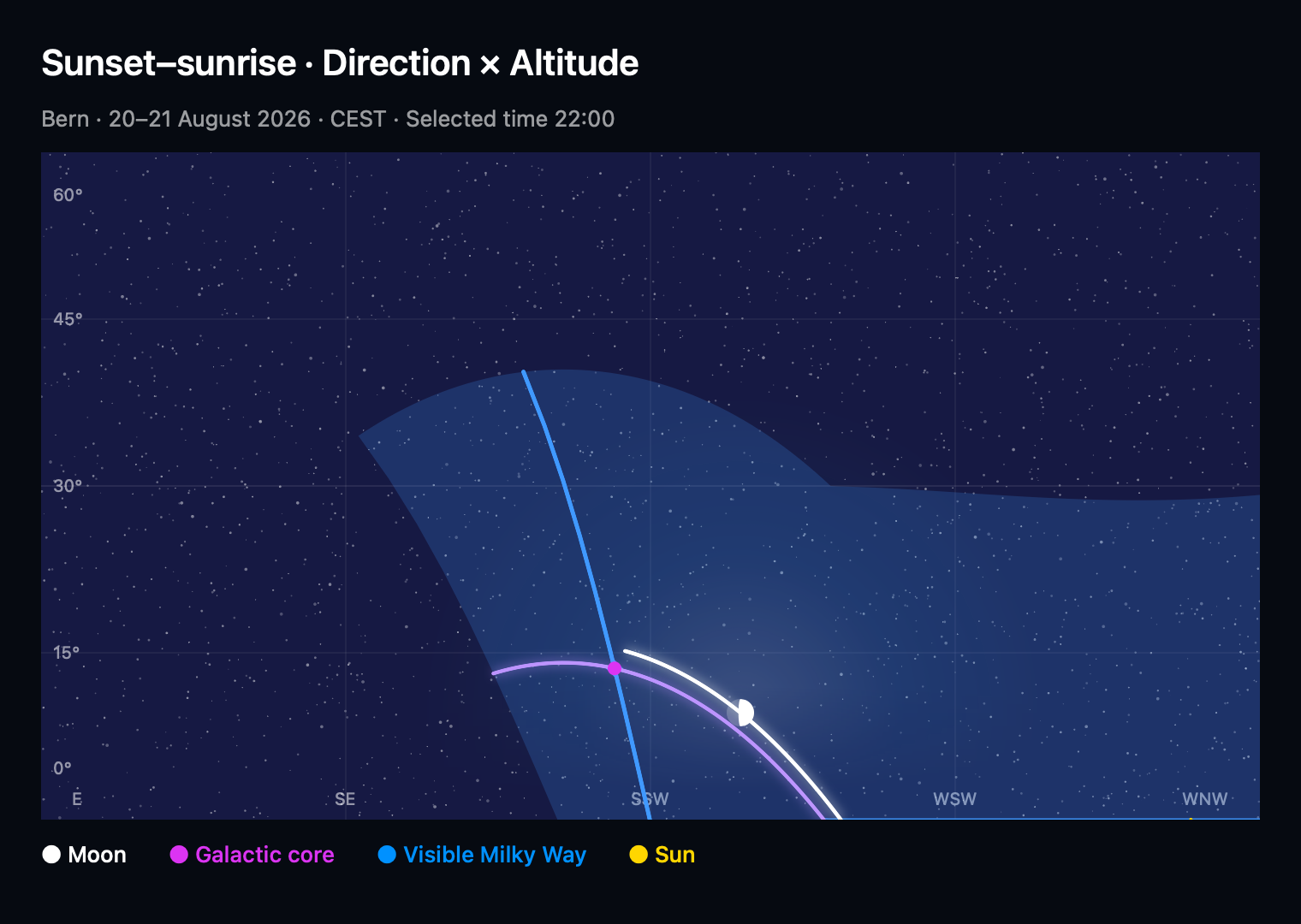
I am particularly careful with the two Moon-distance choices. The Milky Way is a band, not a dot. Distance from the whole visible band and distance from its core side answer different questions; neither is simply the Moon-to-core angle. If the relevant visible band is unavailable, the app cannot assess that distance.
For the phase terminology, NASA’s Moon phases guide explains how the illuminated part of the Moon appears to change as it moves around Earth. Phase describes the visible illuminated fraction; it is not a light-meter reading for my foreground.
I read the time target as carefully as the value
These time targets refer to astronomical night: the dark interval with the Sun below −18°, normally astronomical dusk to dawn. They are percentages of that interval, not a number of hours after sunset. A 50% target means something different in a short summer night and a long winter one. The U.S. Naval Observatory’s twilight definitions explain that boundary.
The Default preset is a useful example of why I check both the range and the time target. Its current definitions are:
| Condition | Ideal | Automatically Acceptable |
|---|---|---|
| Moon phase | At most 15%, throughout the night | At most 40%, for at least 60% of the night |
| Core height | 0°–90°, throughout the night | 0°–90°, for at least 2% of the night |
| Core-side Moon distance | At least 60°, throughout the night | At least 30°, for at least 60% of the night |
| Total cloud cover | At most 10%, throughout the night | At most 40%, for at least 60% of the night |
Those are starting definitions, not universal recommendations. A 2% acceptable core-height target allows a very brief appearance. If I want a long core timelapse, I raise that target rather than assuming “acceptable” means a full evening of recording.
A preference can bend; a requirement has a boundary
I leave a condition as a Preference when a near miss could still be useful. It contributes to the rating and can receive partial credit. I choose Requirement when missing its Acceptable value and time target should rule the night out.
Requirement does not mean every moment must be perfect. If I require a condition to be acceptable for 60% of the night, the remaining 40% is still allowed by that definition. Missing data also stays unknown; a requirement cannot turn an absent forecast into evidence that the sky is clear.
The score helps me shortlist; the timeline helps me shoot
In the current preference grading, Ideal is anchored at 100 points and the Acceptable boundary at 75, with partial credit between and beyond those limits. The overall score follows the lowest known condition score. It is not an average that lets excellent moonlight hide an unsuitable core position, and it is not a probability of photographic success.
There is one more catch worth knowing before setting an early alarm: different conditions can meet their time targets at different times. The core might be up early and the clouds might clear late. Both individual targets can be met without giving me the overlap I wanted.
After I use the ratings to compare dates in Month view, I open the candidate in Day view and inspect Conditions together. That timeline tells me when the conditions coincide. For a timelapse, I still need to identify one continuous useful window. A total share of good time can include separate stretches.
I leave the unknowns visible
A distant date can have useful astronomy and no weather forecast. The app may show a labelled sky-only rating while cloud data is unavailable. Missing, stale or simulated weather is not treated as a live clear-sky forecast, and missing hours are not quietly filled in from their neighbours. I revisit the clouds closer to the trip.
I also keep the scope of the rating in mind. It does not measure haze, seeing, transparency, light pollution or illumination of my particular foreground. A bright Moon above the horizon is not a guarantee that it lights the side of the mountain I am facing. AstroGauge’s alerts use astronomy; I do not treat them as weather-qualified reminders.
Save, then look at a real night
Changes inside a condition update the draft. I use the outer Save when I am ready to apply the definitions; Cancel leaves the previous settings in place. Then I compare a few familiar dates. If everything looks impossible, I loosen the condition that is too ambitious. If almost every night looks wonderful, I check whether my acceptable time target is too easy.
The point is to make the rating useful to me. From here I return to planning the location, date and trip, or use the graph settings guide to choose a clearer view of the candidate night.