Astrophotography & Planning
How I plan astrophotography with AstroGauge
How I turn a photograph idea into a night out: personal sky conditions, a promising location, Moon and Milky Way positions, and dates worth packing a tripod for.
Explore AstroGaugeI’d rather discover that a ridge hides the Galactic core while I’m still on the sofa.
That is where AstroGauge earns its place in my planning. I start with the photograph I want, give the app my idea of good conditions, and let the calendar help me find a night worth a closer look. The plan becomes more specific as I go: a place, a date, a direction and, eventually, a reason to set an alarm at an unreasonable hour.
My kind of good night
Before I start browsing dates, I open Settings → Ideal conditions. A good night for faint Milky Way detail and a good night for a moonlit landscape can be quite different. Sometimes I want the Moon out of the way. Sometimes it is the light source I am hoping to use.
I choose a preset, then adjust the conditions that matter to this photograph. The ratings become much more useful when they reflect my preferences. I do not need to demand perfection from every condition; I need a sensible way to recognize a promising night. There is enough to explore here for a separate article, so I have written more about how I set Ideal and Acceptable conditions.
The foreground gets a vote
Next I set the shooting location. I can use my current position, return to a saved spot, search for somewhere new or choose a point on the map. For a trip, I check the destination and its time zone before I get attached to a particular night. The Bern sample is handy for exploring; my actual plan needs my actual location.
Then I think about the view from that spot. A lovely patch of dark sky is less helpful if the subject is behind the ridge I wanted in the foreground. I look at the Moon and Galactic core together: where they will be, how high they will get, and whether their positions make sense for the composition.
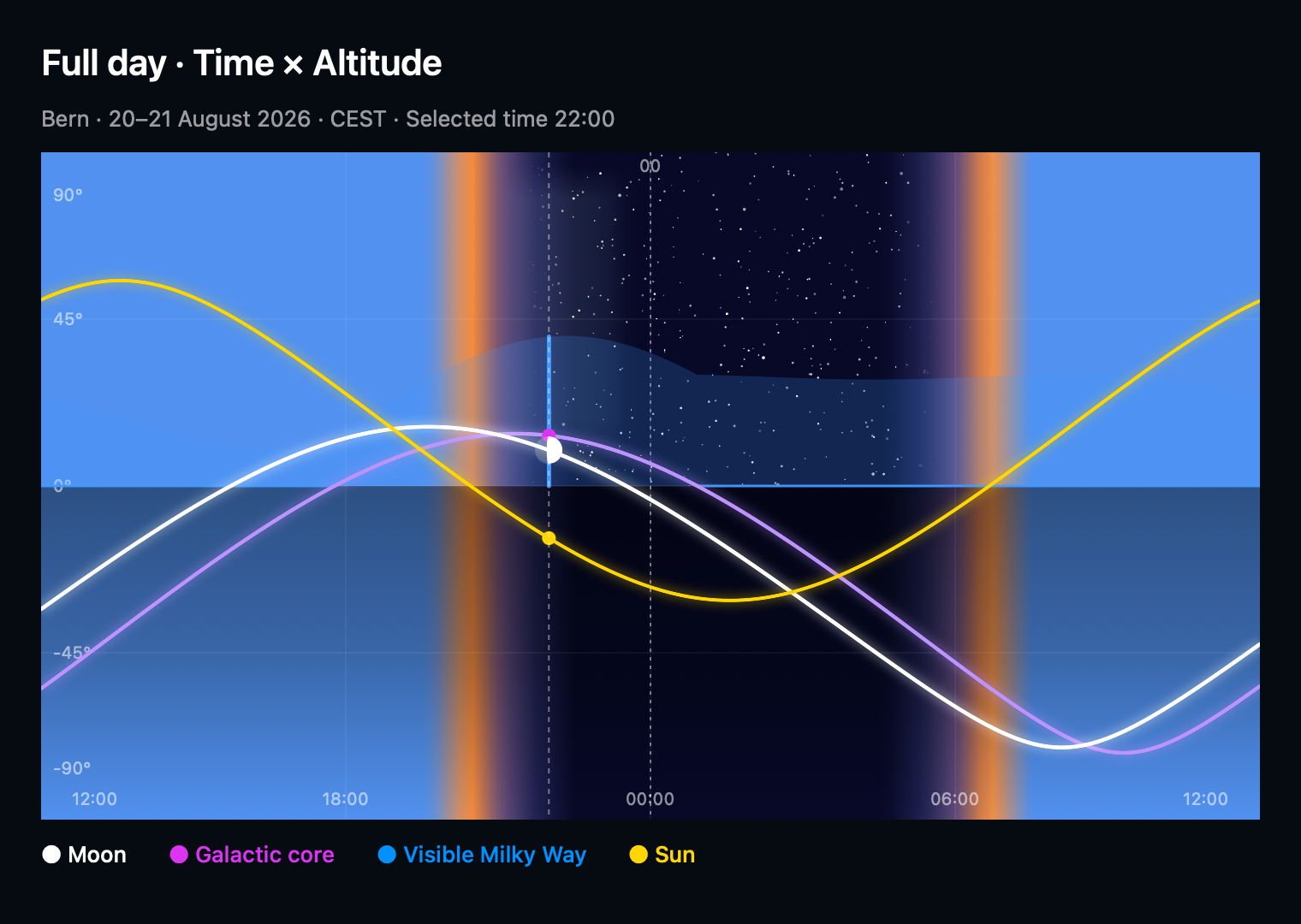
I keep the core separate from the wider Milky Way band. The band can be visible when the core is below the horizon, and a calculated horizon cannot tell me about every nearby tree or building. The app helps me arrive prepared; a little scouting still has plenty to say. If the graph feels unfamiliar, my guide to AstroGauge’s graph settings starts with a straightforward time-versus-height view and builds from there.
Letting the month surprise me
Once my conditions and location are set, I zoom out to Month view. This is the part I find especially helpful: instead of choosing a date and hoping the sky will cooperate, I can look for dates that fit the photograph. A different weekend may give me a much more useful arrangement of darkness, Moon and Milky Way.
I shortlist a few nights that also fit real life. A strong rating is a match to my chosen conditions, not a reservation for clear skies. Farther ahead than the weather forecast reaches, I compare the astronomical possibilities first and leave the cloud question open. I can return to it closer to departure, when there is a forecast rather than a guess.
A promising date becomes an actual evening
A month is good for possibilities. Day view is where I find the hours I can use. I open a candidate date, expand its details and compare astronomical darkness with the Moon’s position, the core’s path and the available cloud forecast.
I am looking for an overlap: the subject in the right part of the sky, enough darkness for the image, and conditions I am happy to work with. A whole-night rating cannot replace that look at the clock. For a timelapse, I check the beginning, middle and end of one continuous window. Several useful fragments of a night do not automatically become one long recording opportunity.
This is also where I move between graph views. Time and altitude help me read the evening; direction and altitude help me picture the scene. I do not need one graph to answer every question.
Then I pack the tripod
With a place, date and useful window in mind, I work backwards to an arrival time. I want room to reach the spot, check the foreground, set up, focus and make a few test exposures before the interesting part begins. If travel is involved, a backup date or nearby composition is reassuring company.
Before leaving, I check access, weather, batteries and storage. On location, the phone gives me room to inspect the plan and the Watch is helpful for a quick look. Astronomy works offline with the current or a saved location; fresh cloud forecasts need a connection.
The reward is less time wondering what the sky is about to do, and more time paying attention to the photograph. AstroGauge is free on the App Store, and the app overview has more about its planning views.